Powered by Blogger.
RSS

Next launcher theme Soft Blue v5.1 APK

Next launcher theme Soft Blue v5.1 APK
Requirements: Android 2.2 and up
Overview: Support 3D and 2D mode

We represent your attention theme «SOFT TOUCH BLUE 3D» for Next launcher by GAaAN

■ Features of theme:
- Support 3D and 2D mode
- Clock widget in "soft touch" style
- 2HD wallpapers in "soft touch" style
- 313 icons (specially designed in "soft touch")
- 99% changed graphic elements in "soft touch" style

■ Installation Instruction of theme:
1. Installing Next launcher as your home launcher
2. Buy the theme on Google Play - install - open - start (!!! Before you click on the "start" button, see menu theme. Menu theme will appear after you click "open" in Google Play. In the menu you can see my other themes, also see screenshots of the installation theme in the "Help")
3. Use the theme:
- (2D mode): Мenu – Theme - Installed - click icon theme "Soft touch blue" - Applay - Done
- (3D mode): Мenu – Preferences - Switch to 3D scene mode - ok - menu - theme - installed - click icon theme "Soft touch blue" - Applay - Done
4. Add a widget clock in theme:
- Before you add a widget change the wallpaper to "SoftTouch" without a logo “Next Launcher” ( it’ll be download with theme). Follow the instructions: Menu – wallpaper – Next wallpaper - Search a "SoftTouch blue” wallpaper (without a logo Next launcher)-apply it.
- Now install the widget:
Menu – widget – System widget - Search "SoftTouch blue clock" - apply it. Widget’s size and place will change after the long press at the widget.

More Info: Google Play

http://adf.ly/ZA4iv

Next Launcher 3D v2.07.1 Patched APK

Next Launcher 3D v2.07.1 Patched APK
 This is Patched version, no lucky patcher or Google Play MOD needed!
Requirements: Android 2.2+
Overview: Most popular premium launcher Next Launcher 3D shows you how 3D dynamic effects and highly customizable Android home screen replacement app could redefine your Android device.


 Big Milestone: Debut of Real 3D Launcher Scene

Forget about everything tiling on the flat like dead fish. Forget about the icon showing like a piece of paper. Forget about the dock standing in line like dumb wood. Forget the traditional launcher and embrace REAL 3D Launcher!
Next Launcher 3D is so proud to present the first REAL 3D Launcher in Google Play Store. Evolution is coming.
Extend imagination, extend capabilities!
Join millions of users for unique and splendid operation experience and visual enjoyment!
■ Testimonials
“One of the most heavily customizable, fluid, and striking launchers we’ve ever seen here at Redmond Pie.” - Redmond Pie
“A gorgeous app packed with dynamic effects and 3D elements. The gratifying 3D visual elements, transition effects, and gestures will get you a different and brilliant visual enjoyment and operation experience.” - Topapps
“The launcher features crazy 3D effects, turning any device you own into a futuristic Tron-centric trip. With additional themes and custom widgets downloadable from Google Play, it’s an extensive and extremely comprehensive option for someone looking to spice up their device.” - Droid-life
■ Key Features
- Extremely fancy 3D effect with buttery smooth experience
- Real 3D Home Screen Transition Effects (Crystal, Cloth, Folding and more coming soon)
- Stunning 3D screen preview with dazzling animation of screen switching
- Build unique icon style by changing its size, angle, style and label (Icon Editor)
- Combine all good parts from different themes into a single theme you really love (Theme Mix Mode)
- Efficient and powerful batch apps management with gestures
- Up to 8 different gestures available in home screen and app drawer
- See how cool your phone could be by blowing all the icons and the widgets to air space (Floating Mode)
- Enhanced shining border effects for home screen transition
- Up to 7 rows on dock to shortcut all your favorites
- Keep releasing 3D Next widgets, 3D themes and live wallpapers special designed by GO Launcher Dev Team
Watch Next Launcher 3D demo.
http://www.youtube.com/watch?v=88mjYORVVRc
■ FAQ
1. Why I have to set Next Launcher as default home screen replacement each time after some devices restarted?
A bug in Android system 4.1.x causes the problem. If you happen to encounter this issue, please download Next Launcher Patchin Google Play and follow the tutorials to fix it.
2. How to avoid home screen elements loading problem?
Please do not install Next Launcher 3D into your SDcard. It will help avoiding home screen elements loading problem due to SDcard loading delay if you restart your phone or remove SDCard.
3. How to use icons in GO Launcher themes?
Install a Go Launcher theme -> Click “Next Key”- > Click "Theme Mix" -> Click the shining desktop elements -> Find the GO Launcher theme and apply it.
If you couldn’t apply some themes, please send themes name and your Next Launcher version to nextlauncher@gmail.com. We will follow us ASAP.
We strive to become better than we are, providing the best Android home screen replacement for you! Thanks for your support!
More tips: http://www.goforandroid.com/GDTEn/faq.aspx?softid=55&nav=99

What's New
V2.07
1.(3D) Gravity sensor is supported in home screen (Menu->Preference->Screen settings->Gravity sensor)
2.(3D) More advanced settings
3.(Improved) Support add/delete screens in screen edit mode (Long press the free area on screen)
4.(Improved) Compatible with Android 4.4
5.(Fixed) S4 with some particular ROMs will be stuck in the carrier logo when reboot
6.(Fixed) Some FC bugs

 This is Patched version, no lucky patcher or Google Play MOD needed!

More Info: Google Play 

http://adf.ly/ZA1Ek
 

F18 Carrier Landing v5.85 APK

F18 Carrier Landing v5.85 APK
Requirements: 2.1+
Overview: Mobile Aircraft Carrier Landing Simulator !


Landing on a flight deck is one of the most difficult things a navy pilot will ever do. The flight deck only has about 500 feet (about 150 meters) of runway space for landing planes, which isn't nearly enough for the heavy, high-speed jets F/A-18 Hornet. Like a Top-Gun pilot enjoy afterburner, tonneau, loop.

You will be the pilot of F/A-18 Hornet, F-14 Tomcat and C-2A Greyhound aircraft flying in virtual environments with a stunning graphic. You will have the possibility to see again your performances with 30 seconds REPLAY function with the possibility of changing the point of view switching between several cameras and immediately share personal screenshots on Facebook and Twitter!

For a worldwide challenge!
Happy landing!

Features:
Missions: Gameplay Engine with six different missions.
Enjoy Start your flight from carrier, learn to land on the ground airbase, go for patrol and photo reconnaissance.
Learn levels
Free/Random Landing level with advanced weather conditions settings (wind, rain, fog) and different scenarios (day, dawn, overcast, night).
Other features:
Multi-touch controls.
F/A-18 Hornet cockpit view mode.
I.F.L.O.L.S. approaching system.
XPERIA PLAY Optimized

What's in this version: (Updated : Oct 21, 2013)
MiG29K Fulcrum
Bug fixes
Flight engine improved

More Info: Google Play

http://adf.ly/Z9x3v

Garfield Kart v1.02 (Unlimited Money)

Garfield Kart v1.02 (Unlimited Money)
Requirements: 3.0+
Overview: Join Garfield and his friends in the funniest fast and fur-ious game!


What character do you want to play with? Garfield, Odie, Jon, Nermal... you choose! Take part in no holds barred crazy races in either multiplayer mode or against the computer!
Challenge your friends whatever platform they're on (mobile, tablet, PC, Mac, etc...) thanks to the CROSSPLATFORM multiplayer mode!
Use your best driving skills and the bonus objects to be 1st across the finish line! But watch out... it's a free for all out there!
• 16 DIFFERENT CIRCUITS - stunning 3D environments from the world of Garfield (Garfield's neighborhood, the city, the Mally supermarket, the sunny farm, the misty docks, the oasis, the dark manor house, etc.)
• 8 CHARACTERS - Garfield, Odie, Jon, Nermal, Arlene, Liz, Harry and Squeak.
• ONLINE MULTIPLAYER MODE and LOCAL MODE: invite your friends and take on up to 5 opponents! Multiply the mayhem!
•CROSSPLATFORM multiplayer mode - challenge your friends on any device! All they need is the game!
• Use your DRIVING skills (skids, mini jumps, shortcuts)
• 8 BONUSES for some crazy attacks and defenses (Exploding Diamonds, Lasagnas, Pies, Magic Wand, Pillow, Bewitching Perfume, Flying Saucers)
• 3 GAME MODES- Grand Prix / Single Race / Time Trial
• 3 DIFFICULTY LEVELS: 50cc, 100 cc and 150 cc
• DAILY CHALLENGE: try out a new challenge every day!
• CUSTOMIZE your characters with tons of hoods and accessories
• 2 TYPES OF CONTROL - drive the kart with the gyro or the touch buttons

More Info: Google Play

http://adf.ly/Z9v7o

Tainted Keep v1.0 (Unlimited Life / Energy)

Tainted Keep v1.0 (Unlimited Life / Energy)
Requirements: 4.0 and up
Overview: The once idyllic village of Greenhaven is now a near lifeless husk, the souls of its inhabitants having been drained by the powerful wizard Morg, who has used them to create the abominations that now occupy the mighty keep that was once the source of protection for the village.

Morg’s evil influence has caused the people of Greenhaven to forget their old lives of happiness and even the presence of Morg himself, instead falling into a mindless stupor.
With the village’s crops withering untended in the fields and its people heading mindlessly toward oblivion, the one person unaffected by Morg’s influence,a young woman named Xobia, enters the keep to find the source of Morg’s power and put an end to the misery that has been unleashed on the hapless village.
• Cast a single spell, or chain it with another to make a more powerful spell.
• Weapons that upgrade visually as you release more souls.
• Unique and twisted domains that contain powerful treasure.
• Gems that you can slot into your weapon to adjust different statistics within it.
• A variety of fearsome creatures to defeat!
• Ultra graphic settings for Tegra 4 devices
• HD quality resolution
• Full world dynamic shadowing
• Stunning dynamic reflections
• Adjustable graphic settings
• Full screen effects
• Test your hardware capabilities with our unique built in benchmark mode
• Full gamepad support as well as touch screen controls.

More Info: Google Play

Download APK:

http://adf.ly/Z59ob
 Download Obb Files:
Part 1Part 2.


PrinterShare™ Mobile Print Premium v8.6.5 APK

PrinterShare™ Mobile Print Premium v8.6.5 APK
All Premium Features available. no key file needed.
Requirements: Android 2.2 and up


 Overview:
Print anytime, anywhere from your Android device! Now you can instantly print PDF files, office documents (Word, Excel, PowerPoint), bills, invoices and more directly from your device to a printer right next to you or across the world.

Also you will be able to print photos and images (JPG, PNG, GIF), print emails from Gmail (including attachments: PDF, DOC, XSL, PPT, TXT), print contacts, agenda, sms/mms, call log, web pages (HTML) and other digital content from device internal memory, SD card or cloud source such as Google Drive / Google Docs.

You may configure many print options including paper size, page orientation, number of copies, page range, one- or two-sided printing (duplex mode), print quality (resolution), printout mode (color or monochrome), output tray and more.

With the free version of the app you can:
* Print a test page to determine compatibility, as not every printer is supported;
* Print via Google Cloud Print (including save to Cloud Drive as PDF) at no extra-charge;
* Print 20 pages in Remote mode over the Internet.

For unlimited printing you need to purchase PrinterShare Premium Key, a separate small application that simply needs to be on the device to unlock Premium Features of the free app. Prior to buying the key we highly recommend printing the test page to ensure compatibility with your printer.

Premium Features:
* Nearby direct printing (PDFs, documents, photos and more) via Wi-Fi, Bluetooth and even USB without PC;
* Nearby printing to Windows shared (SMB/CIFS) or Mac shared printers;
* Unlimited Remote printing. The receiving end (Windows or Mac) would not have to buy pages or subscribe.

PrinterShare is supporting a wide variety of HP (Officejet, LaserJet, Photosmart, Deskjet and other series), Epson (Artisan, WorkForce, Stylus and other series), Canon (PIXMA MP/MX/MG and other series), Brother, Kodak , Samsung, Dell, Lexmark and other printers including legacy networkable. A full list of supported printers available at http://printershare.com/help-mobile-supported.sdf

Please note:
1) Requested permissions are needed to print content and are not used to collect your personal data. For a more detailed explanation see our FAQ at http://www.printershare.com/help-mobile-faq.sdf
2) Google Cloud Print requires latest version of Chrome browser on your computer or Google Cloud Print capable printer. For more setup instructions please read http://www.google.com/support/cloudprint/
3) If something isn't working as expected, please send us an email to support@printershare.com

Have a good print!

* For direct nearby printing to selected printer models PrinterShare downloads and uses drivers provided by HPLIP (http://hplipopensource.com) and GutenPrint (http://gimp-print.sourceforge.net). These drivers are distributed under GNU General Public License, version 2.

What's New:
- changes to support Android 4.4 KItKat
- added drivers for some new HP printers
- added Page Scaling printing option for PDF
- bugs fixed

Note: All Premium Features available. no key file needed.


More Info: Google Play

http://adf.ly/Z525h


Freedom (Google Play in-App Purchase Hacking) v0.9.7 APK
Freedom (Google Play in-App Purchase Hacking) v0.9.7 APK
Requirements: Android 2.+ Rooted Device
Overview: If you use this App and you have an error, please change your language to russian or change the Timezone to Moscow (GMT +4)


Enabling Freedom on your device takes 3 steps:
  • Download
  • Install & launch
  • Tap on app in which you want to receive in-app purchase for free.


Install Freedom on your device and launch it.

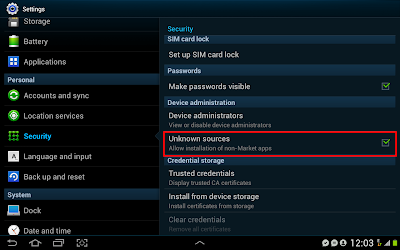
Make sure that you have "Unknown sources" enabled in your security settings:

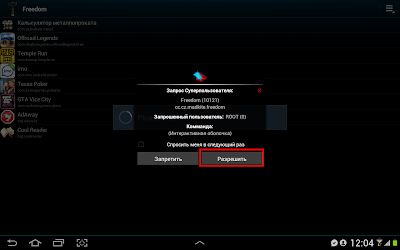
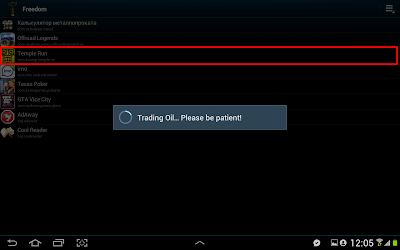
Install downloaded APK and launch it (first launch takes a while, please be patient), allow superuser permissions request:


Launch application through Freedom

Tap on application in which you want to use free in-app purchase, wait a little. Application should start automatically:
 
 
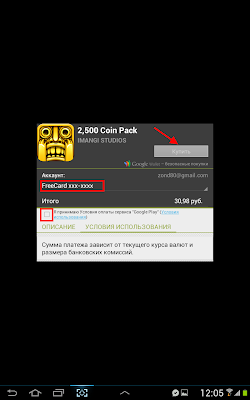
Next, make your in-app purchase (appearing of FreeCard means that Freedom is running successfully):
 
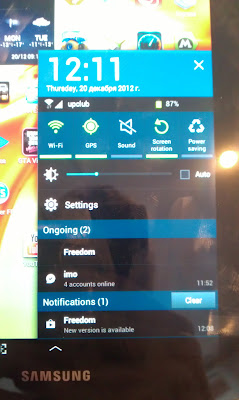
From time to time you can receive OTA updates for Freedom, just tap on "Update Available" dialog and update should start automatically. Here is screenshot of running Freedom and update available for download:
You should use Freedom every time you want to use free in-app purchase, e.g. Freedom is a launcher for your apps.
And this program does not work with online applications and will never work with online applications.
If you want to remove Freedom, first launch it, go to MENU, then tap on STOP. Next you can remove Freedom successfully. IF YOU DID NOT DO IT - YOU ARE NOT ABLE TO USE GOOGLE PLAY WITHOUT FREEDOM!


http://adf.ly/Z4zhf