Powered by Blogger.
RSS

Next Launcher 3D v2.02 APK

Next Launcher 3D v2.02 APK

 Description

Most popular premium launcher Next Launcher 3D shows you how 3D dynamic effects and highly customizable Android home screen replacement app could redefine your Android device.
Big Milestone: Debut of Real 3D Launcher Scene
Forget about everything tiling on the flat like dead fish. Forget about the icon showing like a piece of paper. Forget about the dock standing in line like dumb wood. Forget the traditional launcher and embrace REAL 3D Launcher!
Next Launcher 3D is so proud to present the first REAL 3D Launcher in Google Play Store. Evolution is coming.
Extend imagination, extend capabilities!
Join millions of users for unique and splendid operation experience and visual enjoyment!■ Testimonials
“One of the most heavily customizable, fluid, and striking launchers we’ve ever seen here at Redmond Pie.” - Redmond Pie
“A gorgeous app packed with dynamic effects and 3D elements. The gratifying 3D visual elements, transition effects, and gestures will get you a different and brilliant visual enjoyment and operation experience.” - Topapps
“The launcher features crazy 3D effects, turning any device you own into a futuristic Tron-centric trip. With additional themes and custom widgets downloadable from Google Play, it’s an extensive and extremely comprehensive option for someone looking to spice up their device.” - Droid-life
■ Key Features
- Extremely fancy 3D effect with buttery smooth experience
- Real 3D Home Screen Transition Effects (Crystal, Cloth, Folding and more coming soon)
- Stunning 3D screen preview with dazzling animation of screen switching
- Build unique icon style by changing its size, angle, style and label (Icon Editor)
- Combine all good parts from different themes into a single theme you really love (Theme Mix Mode)
- Efficient and powerful batch apps management with gestures
- Up to 8 different gestures available in home screen and app drawer
- See how cool your phone could be by blowing all the icons and the widgets to air space (Floating Mode)
- Enhanced shining border effects for home screen transition
- Up to 7 rows on dock to shortcut all your favorites
- Keep releasing 3D Next widgets, 3D themes and live wallpapers special designed by GO Launcher Dev Team
Watch Next Launcher 3D demo.


What's New
V2.02
1.(3D) Support displaying icon labels on homescreen
2.(3D) Improve widgets resizing experience
3.(New) Hyper fluence (Menu->Preference->Advanced settings)
4.(New) Auto clean up (Menu->Preference->Advanced settings)


AVP: Evolution v1.4.1 APK

AVP: Evolution v1.4.1 APK


Play as both the Alien and Predator in this official game brought to you by Angry Mob Games, the creators of PREDATORS™, Guerrilla Bob and Muffin Knight.

On a distant planet, the blood feud between Predator clans continues to rage. In a final attempt to eradicate the Jungle Hunter Clan, the Super Predators secure the capabilities of an unlikely and unwilling species, the Aliens. As an Alien, you must ultimately destroy the Super Predators and free your species from enslavement. As a Jungle Hunter Predator, you must eliminate the Alien Queen in order to prevent the Super Predators from annihilating your clan.

VICIOUS CHARACTERS & FIERCE COMBAT

  • Two distinct gaming experiences as you engage in the ultimate battle as both the Alien and Predator 
  • Vicious attacks and brutal finishing moves give players a lethal arsenal to wreak havoc on the enemy
CREATE YOUR OWN ULTIMATE KILLING MACHINE
  • Engineer your own unique Alien and Predator via character upgrades, enhanced abilities, and a multitude of powerful armor and weapons 
  • Gain the advantage in battle with Facehugger Calls, Rage Rechargers, Net Guns, Proximity Mines, Thermal Vision, Alien Vision, Plasma Cannons and much more
CHILLING ENVIRONMENTS
  • It’s kill or be killed as you advance through the Temple Arena, Marine Base, Alien Hive and many other eerie settings
INCREDIBLE GRAPHICS UNLEASHED
  • Rich detail, impressive character models and distinctive lighting
What's in this version: (Updated : Sep 10, 2013)
  • Added Google Play Game Services
  • Compare your scores with your Google Plus friends
  • Share your achievements online
  • Cloud Saving to sync your progress across devices
  • nVidia Shield support
  • Major performance improvements
  • Real time lighting on high end Tegra devices
  • Difficulty rebalancing
 Download APK+Obb files:

BusyBox X+vX+

BusyBox X+ vX+
Requirements: Android 2.3+, Rooted
Overview: BusyBox X+ is a complete busybox installer that installs busybox 1.21.1 to your device. While both installers the free and pro versions have same functionality. This one has the LATEST busybox and manual included - just scroll down - and a single click install.


BusyBox is required for many rooted apps to work.*** Root Essentials
*** Requires Root to Install / No Root to try (decaf)
BusyBox X+ is a complete busybox installer that installs busybox 1.21.1 to your device.
While both installers the free and pro versions have same functionality. This one has the LATEST busybox and manual included - just scroll down - and a single click install.
It also makes sure that busybox is completely installed including links to all commands, yes all of them.
The Pro Installer is for those who have used BusyBox Free 1.20.0 and liked that one.
Pros:
1. LATEST 1.21.0 BusyBox
2. Manual Included
3. Smallest Size than the others
4. Single Touch Install
5. Uninstall Installer App after use to save space
6. Installs all Commands
Internet Permission only to load latest info.
What users from the web say:
--------------------------------------------------
Previously I had highlighted some negative remarks about Stephen's and Jared's Installers that I saw on XDA. I guess that was not fair. Their installers have been around for years. I had a negative experience with those long time ago that led me to create this app in the first place. But that is not the case anymore, both of them are awesome and support a lot of phones if not all. I recommend all readers to use their apps first and comeback if you find issues. The same also holds true the other way around. If somehow this installer sucked, please try theirs. Also do not forget to send bug reports to respective developers of the apps so that we can make our apps better. Please note that when you write reviews now on, please do not write anything negative about other apps and their developers. I apologize to Stephen and Jared for this, I should not have bashed your apps and hard work and I hope that my apology will be accepted.
--------------------------------------------------
BusyBox is licensed under the GNU General Public License, version 2
About:
BusyBox: The Swiss Army Knife of Embedded Linux
BusyBox combines tiny versions of many common UNIX utilities into a single small executable. It provides replacements for most of the utilities you usually find in GNU fileutils, shellutils, etc. The utilities in BusyBox generally have fewer options than their full-featured GNU cousins; however, the options that are included provide the expected functionality and behave very much like their GNU counterparts. BusyBox provides a fairly complete environment for any small or embedded system.
BusyBox has been written with size-optimization and limited resources in mind
BusyBox is maintained by Denys Vlasenko, and licensed under the GNU GENERAL PUBLIC LICENSE version 2.
-- busybox.net
I used the .config templateUpcoming releases will feature Danilo's build method with NDK to support x86 and MIPS along with ARM
Why another busybox pro installer? Cos other installers and rooted phones sometimes come with not configured busybox and no links to commands. As a result rooted apps fail to work. So I created this installer. I hope that this will become the de-facto adfree and busybox pro installer.Also +1 this app, give honest ratings and feedbacks to motivate me. For any issues, feel free to e-mail me.
-Robert Nediyakalaparambil
Tags: busybox installer, busybox, superuser, su, root, terminal, shell, script, bb, adb, toolbox, linux, unix, tools, android root, commands, run


What's New:

Removed the need for Internet Access Permission.
Removed Redundant Settings Menu.
Added Decaf Mode to use without root - Requires Android Terminal Emulator from Jack Palevich (jackpal.androidterm)
Now Supports ARM, MIPS and x86 out of the Box!

SuperSU Pro v1.65 +Patched

SuperSu Pro v.1.65

Requirements: Android 2.1+, Rooted phone
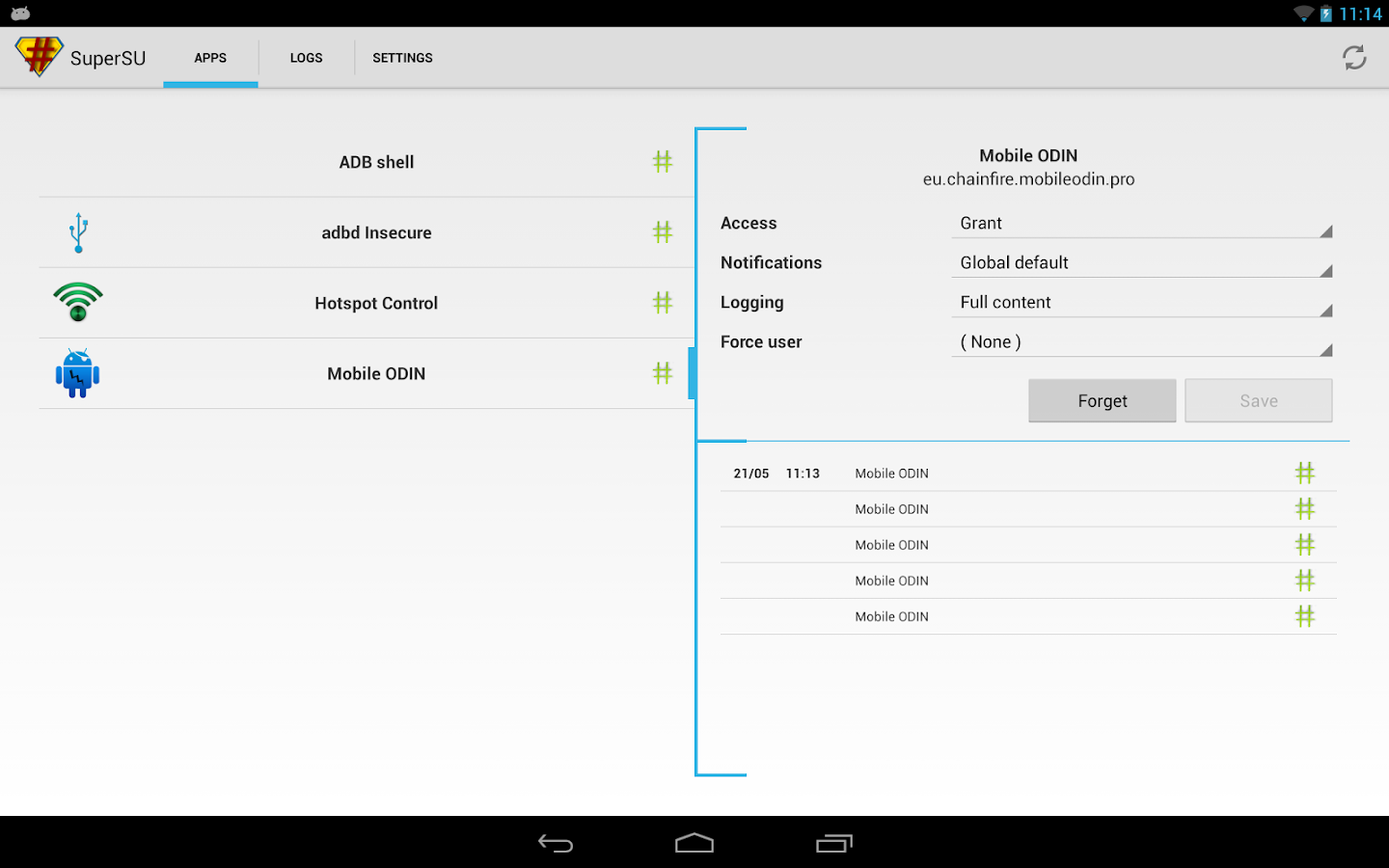
Overview: SuperSU is the Superuser access management tool of the future


!!! SuperSU requires a rooted device !!!
SuperSU allows for advanced management of Superuser access rights for all the apps on your device that need root. SuperSU has been built from the ground up to counter a number of problems with other Superuser access management tools.

Features include:
- Superuser access prompt
- Superuser access logging
- Superuser access notifications
- Per-app notification configuration
- Temporary unroot
- Deep process detection (no more unknowns)
- Works in recovery (no more segfaulting)
- Works when Android isn't properly booted
- Works with non-standard shell locations
- Always runs in ghost mode
- Wake on prompt
- Convert to /system app
- Complete unroot
- Backup script to survive CyanogenMod nightlies
- Icon selectable from 5 options + invisible
- Theme selectable from 4 options
- Launch from dialer: *#*#1234#*#* or *#*#7873778#*#* (*#*#SUPERSU#*#*)
NOTE: Not all phones take both codes. On some phones you need to use single *# instead of double *#*#
The Pro version additionally offers:
- OTA survival mode (no guarantees)
- Full color-coded command content logging (input/output/error)
- Per-app logging configuration
- Per-app user override
- Grant/deny root to an app for a set amount of time
- PIN protection
- Per-app PIN protection
- Adjust auto-deny countdown

The discussion and support thread can be found on XDA-Developers here:
http://forum.xda-developers.com/show....php?t=1538053

SUPERUSER
This is meant to replace Superuser (if installed), you use either one or the other. You cannot combine them. Statements that this breaks Superuser are therefore completely nonsensical.

NOTICE: A SPECIAL PROCEDURE IS NEEDED FOR UNINSTALLATION. IF YOU DO NOT LIKE THE APP, DO *NOT* JUST UNINSTALL IT, YOU *WILL* LOSE ROOT.
Superuser access management runs through a so called "su binary". There can be only one of these at a time. So if you install SuperSU, your previous superuser access management solution will no longer operate. So if you want to switch back: (1) Open that application, and search for an option for it to install/update/replace the "su binary". (2) Confirm root-using apps are using the superuser solution you want. (3) Uninstall SuperSU.

TRANSLATIONS
Want to help translate SuperSU ? See http://www.getlocalization.com/supersu/ !

What's New
NOTE: If you just upgraded to Android 4.3, you need to manually re-root, as just updating the app may not suffice.
v1.65
- Brought back ARMv5 compatibility
- Fixed compatibility issues with Android 2.x
- Updated language files
v1.60
- Added SELinux+Enforcing compatibility (new SGS4 ROMs)
- Fixed (newest) CWM versions asking you question that break root if answered wrongly
- Fixed issue with the TWRP/CWM binary installer
- Fixed 4.3 OTA survival looping

 SuperSU v1.65 + SuperSU Pro v1.00:
SuperSU Pro v1.65 Patched (Unlocked Pro features in SuperSU! No pro key is required!) Flash Flashable-SuperSU-Pro-v1.65.rskmania.blogspot.com.zip in CWM/TWRP:
 

TSF Shell v1.9.9.7.2 Patched

TSF Shell v1.9.9.7.2 Patched
Requirements: 2.2 and up
Overview: TSF Shell is a brand-new 3D launcher that will subvert your concept of the mobile device home screen operations.


It offers smooth, unique and customized man-machine interactive operation experience. You are allowed to define all the elements of the home screen freely and efficiently. TSF Shell keeps creating new features and exclusive 3D widgets that will bring you amazing operation experience and unprecedented visual.

Main features:
========================
1.Fantastic animation transition effects. All operations, including deletion, addition, menu showing-up or vanishing, are provided with natural, glaring and butter-smooth animation transition effects.

2.Miraculous and effective 3D home screen switching mode and freewheeling home screen element layout mode. More than 10 independent layout home screens supported.

3.Unlimited dock bar. Ability to change its position, length and angle as well as to modify the size and the status (hidden or showed) of icons and folders in the dock bar. You can open the apps and the folders in the dock bar with wave-sliding mode.

4.Batch icon selecting for home screens, folders and dock bar.

5.More than 10 TSF Shell exclusive widgets, such as Message, Clock, Weather, Memo, Music, Gallery etc. All 3D widgets provide unique visual and operative experience.

6.More than 9 gestures supported for Android shortcuts, e.g. app launching, phone call, sms, as well as TSF Shell shortcuts, e.g. home screen switching, status bar hiding, TSF Shell side bar hiding.

7.TSF Shell Arch Shortcut Menu with special animation effects and operative experience. Ability to complete quick custom shortcut operations on any home screen.

8.Pioneering icon editing tool. Ability to customize icon back image, upon image, text label style, etc.

9.Many nice free third-party themes are available.

10.Funny and intuitive TSF Shell settings menu. You can preview the corresponding settings directly.
========================

We are working constantly to improve TSF Shell. We update our product and widgets regularly. Please check for updates often to insure you receive the best experience.
What's New
Version 1.9.9.7.2 (Set.11,2013)
1.Transparent Notification Bar (This will only work if your system software/ROM supports it )
2.Fixed crash issue with Themes Mix
3.Fixed failed Icon Theme setting after applying themes
4.Fixed other known bugs
Version 1.9.9.7 (Set.1,2013)
1.Theme Mix (Support all theme material)
2.Widget Preview
3.Extra Desktops Quantity(The minimum quantity of the extra desktops was changed to one)
4.Repaired problems that some devices runs TSF Shell not smoothly

TSF Th Pink Heart Black Crown v.1.0 APK

TSF Th Pink Heart Black Crown v.1.0 APK


Description
TSF Shell Pink Heart Black Crown
TSF Shell Launcher Theme Pink Heart Black CrownThe Theme includes six wallpapers, alarm clock and package of icons.
Please install the latest version of TSF Shell Launcher.
To install the Theme:
- Install TSF Shell Launcher (it must be obtained separately).
- Install the Theme.
- Tap on Settings and choose Theme.
- Select the Theme and apply it.
To Change the Wallpaper: Find Theme's wallpaper and apply it.
To Open the Alarm Clock: Select "Widgets" and find the Theme's Alarm clock.

Riptide GP2 v1.0.2 [MR.MEFISTO UNLIMITED MONEY] APK

Riptide GP2  v1.0.2 [MR.MEFISTO UNLIMITED MONEY VERSION] APK

Description
Riptide GP™2 kicks everything into overdrive, with intense online multi-player races, upgradeable hydro jets and riders, improved graphics, an all-new career mode, and a whole new stunt system with dozens of new tricks! Featuring rocket-powered hydro jets racing around futuristic tracks across a dynamic and interactive water surface, Riptide GP2 delivers a fast, fun, and visually stunning racing experience.
From Vector Unit, developers of acclaimed racing games Riptide GP, Beach Buggy Blitz, Shine Runner, and Hydro Thunder Hurricane!