Powered by Blogger.
RSS

SYGIC GPS NAVIGATION v14.3.2 Final + Base (25.06.2014) (HUB Navigation)

SYGIC GPS NAVIGATION v14.3.2 Final + Base (25.06.2014) (HUB Navigation)
Requirements : Android 2.1+
DESCRIPTION:
Sygic: GPS & Navigation Maps


NAVIGATION APPLICATION NO LINK WITH MORE DOWNLOADS IN THE WORLD!
NEW: The pioneering operation Head-up Display (HUD) displays the navigation on the windshield of your car
The application Sygic is a leading GPS navigation system with turn-by-turn guidance, which you can try for free. High quality maps from TomTom and other providers stored on the phone Android, the tablet or the SD card and the navigation is possible without connecting to the Internet. The lifetime license includes free map updates circulate several times a year. For safe and comfortable driving at night, the application provides navigation Sygic Head up Display (HUD).
This version includes a 7 day period to try out the complete navigation system.
_______________________________________
KEY FEATURES
• High quality TomTom Maps stored on the device
• Only works with GPS, no Internet connection is required to
• Navigation turn-by-turn voice guidance
• The function Head-up Display (HUD) is available for purchase from within the app
• Choose between three alternative routes
• Benchmarks for places you want to visit
• Dynamic Lane Guidance for safe lane changes
• View crossings Junction View highlighting the motorway exits
• View speed limits for savings
• Warnings for fixed speed cameras and police checkpoints warnings from other motorists
_______________________________________
BENEFITS
• Free updates for maps and POI
• View cities and attractions in 3D for easy orientation
_______________________________________
MARKETS WITHIN THE SCOPE
• Information on avoiding traffic congestion
• Function Head Up Display (HUD) that displays navigation GPS on the windshield of your car without additional accessories.
_______________________________________
SAFETY AND USER COMFORT
• Warnings sharp turns for added security
• Notifications for upcoming change of speed limit
• Avoid toll roads in segment or the whole trip
• pedestrian navigation for walking and exploring
• Integration with the car's audio system - with Bluetooth or cable
• Improved graphics for viewing on Tablet & HD
_______________________________________
LOCATION SYGIC - FREE EXTENSIONS
• Exclusive POI offered for free download from in My Sygic
• TripAdvisor, Booking.com] and many other
_______________________________________
EXCELLENT SEARCH
Navigate to
• Address
• Contact
• POI
• Postal Code
• Intersection
• GPS coordinates
• Image geo
• Your home
_______________________________________
AVAILABLE MAPS:
Algeria, Andorra, Angola , Argentina, Australia, Austria, Azerbaijan, Bahrain, Belgium, Benin, Botswana, Brazil, Brunei, Bulgaria, Burkina Faso, Cameroon, Canada, Canary Islands, Colombia, Croatia, Czech Republic, Cyprus, Democratic Republic of the Congo, Denmark, Egypt , Estonia, Finland, France, Gabon, Germany, Ghana, Gibraltar, Greece, Hong Kong, Hungary, Chile, Indonesia, Iran, Iraq, Ireland, Israel, Italy,  Kazakhstan, Kenya, Kuwait, Latvia, Lesotho, Liechtenstein, Lithuania, Luxembourg, Macau, Malawi, Malaysia, Mali, Malta, Mauritania, Mauritius, Mayotte, Mexico, Monaco, Morocco, Mozambique, Namibia, Netherlands, New Zealand, Niger, Nigeria, Norway, Oman, Pakistan, Philippines, Poland, Portugal, Qatar , Republic of Congo, Reunion, Romania, Russia, San Marino, Saudi Arabia, Senegal, Serbia, Singapore, Slovakia, Slovenia, South Africa, Spain, Swaziland, Sweden, Switzerland, Taiwan, Tanzania, Thailand, Togo, Tunisia, Turkey, Uganda, Ukraine, United Arab Emirates, United Kingdom, Uruguay, USA, Vatican, Venezuela, Vietnam, Zambia, Zimbabwe
Sygic | Bringing life to maps.

What's new
· Performance Optimizations and many improvements
Increased stability and correcting errors to avoid tolls
Thank you for using Sygic Navigation. If you ever need help or want to send us your comments, visit help.sygic.com
Sygic | Bringing life to maps


INSTALLATION

Fresh install
- Copy Sygic folder to SDcard/Sygic
- Copy maps + content.info to Sygic/Maps (download maps with map downloader below)
- Install sygicnavigator1401_118591cr.apk


            Full Sygic folder + apk (for clean installation)
http://adf.ly/q8pEA


EXTRAS
PC map downloader (latest TA 2014.04 maps) with proper world content.info
(fixed whole world maps versions one by one, according to versions available through latest map downloader, not all are 2014.03).
If europe maps update you can simply change the TA:EXTEUR:2014.03, to new version, if its 2014.06 for example then make it TA:EXTEUR:2014.06 , if its navteq change TA to NT too.

         Map Downloader:
http://adf.ly/q8pVo


Add Watermark v2.9.1


Add Watermark v2.9.1
Requirements: Android 2.0 and up
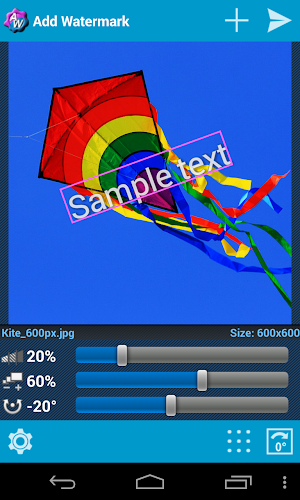
Overview: Add watermarks to your pictures. Lots of settings and features, also auto processing and batch mode.


Udated: June 27, 2014


Add watermarks to your pictures. Put your property text or a logo image into your picture, adjust its size,
transparency, rotation, alignment, then save and share it. Lots of settings and features, also auto processing and batch mode.

FOR SUPPORT AND HELP please contact me via email or website (see below)!

Primary features of the Full version:
- Taking pictures with camera
- Quick share on Facebook, Twitter, Flickr etc.
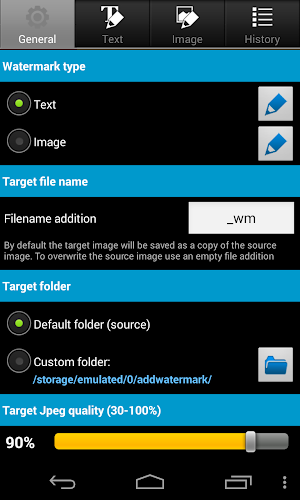
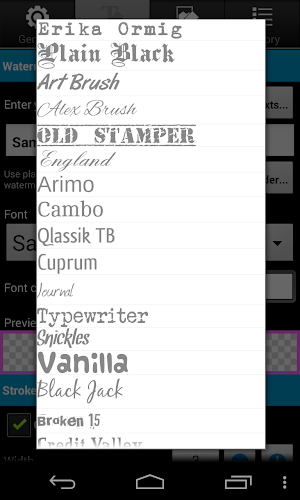
- Fonts, color and other effects in text mode
- 66 built-in fonts, up to 20 custom fonts can be imported
- Easy reusing of recent watermark texts
- Adding of timestamp, filename, GPS tags and other properties as text watermark
- Processing of multiple images in batch mode
- Full support of EXIF data
- Saving target as .jpg or .png
- Support of transparent .png images as watermark
- Rename and resize by saving

Limitations of the Free version:
- User defined image-watermarks are disabled
- Saving only as .jpg, downsized to 1024 px on the long side
- Quick share after saving disabled
- No auto mode by launching from Share menu, no batch mode

Please note, due to memory limitations of mobile devices you could have problems when saving images in full camera resolution (more than 6-8 megapixel, depending on device). If so, it is recommended to use downsize when saving. Otherwise the app reduces the pic's resolution automatically, to avoid out-of-memory errors.

Useful tips:
- Don't delete original images after watermarking, because you can't remove watermarks from processed images.
- To import custom fonts copy up to 20 TrueType or OpenType fonts to folder "addwatermark/custom_fonts" on your device.
- To add watermark direct from Gallery or another app, use Send or Share command and select Add Watermark.
- To quick share a picture to Facebook, Twitter, Flickr etc. enable "Share after saving" in "Save Dialog". The related app must be already installed on the device.
- To datestamp a photo use %date% as text watermark. You find more useful placeholders in Settings / General

Many thanks to:
Muchamad Mahrus for translation in Indonesian!
TomoS for translation in Polish!
ene49 (CepTeam) for turkish translation!
Milly Zecchinato for translation in Italian!
Martin Sotelano for translation in Spanish!
Tristan Lyonnet for translation in French!
Martin Lehmann Madsen for translation in Norwegian!
Magichannel for translation in Chinese!
If you think you could help me to translate this app in other languages, please let me know.

Feel free to contact me: androidvilla@gmail.com
Or visit my blog: androidvilla.wordpress.com

☆ ☆ ☆ What's New ☆ ☆ ☆

- Added indonesian translation. Many thanks to Muchamad Mahrus!
- Added polish translation. Many thanks to TomoS!
- Prevent going into sleep mode and improved progress notification while processing multiple images. Needed one more permission (WAKE_LOCK)

More Info: Google Play

http://adf.ly/q8oOi


Reading Trainer v .1.2.1

Reading Trainer v .1.2.1
Requirements: Android 2.1 and up

Description
Reading Trainer improves your reading speed and retention rate with 12 challenging and fun exercises. The popular speed reading app is finally available on Android!
- Significant increases in your reading speed
- Eye-exercises and improvements in your mental capacity This speed reading app provides everything you need to read texts of all types faster, more effectively and most of all, with better retention.
The PowerReader allows you to get your daily work done while practicing important reading skills.
Learning reading techniques has never been this much fun!
Double your reading speed in just a few days.
Trial users have used this software to increase their reading speed by an average of 143% in 10 days.
Do you currently need 30 minutes to read the daily paper? Soon you will read two papers and, in addition, another chapter in an interesting non-fiction book – within the same time period.
This innovative app provides the ideal platform to achieve measurable results with a minimum of effort.
But that’s not all: You will have fun mastering the skills you need to attain effective reading techniques and significantly increase your reading speed; this means:
- Rapid recognition of numbers, letters and words
- Flexible eye movements
- Improved ability to concentrate
- Increased vision span
The app guides you through the individual training steps.
The software immediately recognizes your strengths and weaknesses. The statistics function lets you see and track your progress.
The results of each training exercise are charted for your review. More stars mean that you are getting closer to your objective: more effective reading skills and with it extremely high reading speeds.
You can check your reading speed at any time using different reading tests from a variety of topics.
Questions about the text are used as a secondary test to assess your retention ability. This is the ideal combination for mastering effective reading skills and high retention rates.
But beware: you might get hooked since early progress will motivate you to work on your skills regularly.
It is fun and you are doing something to stay mentally fit at the same time.
We recommend that you train regularly but not excessively to ensure best results.
Who needs this app?
- Anyone reading more than half an hour a day
- Executives
- Secretaries
- High-School and College students
- Purchasing and Sales Professionals
Who can benefit from this app?
- Do you often feel that you take too long to read something?
- Do you return to previous passages because something was not clear?
- Are you easily distracted while reading?
- Do you have difficulty recalling what you read?
If you answered ‘Yes’ to any of these questions then this app is what you need.
 More Info: Google Play

http://adf.ly/q8mHI

Air Call-Accept v1.11

Air Call-Accept v.1.11
Requirements: Android 1.6 and up
Overview: With this app, you can effortlessly answer or reject your phone calls without even touching it!


With this app, you can effortlessly answer or reject your phone calls without even touching it!

Using the proximity sensor on your phone, it detects when you wave your hand over the screen or when you place the phone to your ear.

Especially useful for drivers with a bluetooth headset, it means you don't have to fiddle around trying to press the correct button, leaving you to concentrate on the road.

If you don't use a bluetooth headset, you can automatically turn speakerphone on to answer calls within the settings, again making life easier on the road.

Also this app can help you reject calls, and send SMS to the caller if you need.

How to use:
Simply install the app and open it up, turn the service on and you're ready to go!

What's New
v1.11
- Fix second call disturb first call issue.

More Info: Google Play

http://adf.ly/q8kkt

Fast Pro for Facebook v2.5

Fast Pro for Facebook v2.5
Requires Android 2.1 and up


Description

Fast has been downloaded more than 5 Million times!! 
Fast for Facebook is a new client to manage your Facebook© account! Fast is born from the idea to give a great and full experience even to the less powerful device!
Fast it’s also a social reader, you can organize your list and read-share all the stories from your favorite blogs or newspapers.

Special Fast’s Features: 
• Use Fast as a news reader creating your own lists of pages and friends
• Read notifications and manage events
• View videos from YouTube© and Facebook© directly in the app 
• Deep User Interface customization 
• Optional Security pin against snoopy 
• Optional Push Notifications Add-on (available on Google Play)
• Download Pictures, Videos and Conversations from Facebook directly in your device
Main features:
• Access to Facebook© news feed
• Send, share, like and comment contents
• Chat and manage private messages
• Search friends, people, pages and everything else 
• Update status, Upload photos and videos
• Access to Groups and Pages 
• Multi accounts
• Facebook© photos download 
• Widget and quick links 
After many Updates, it is a Facebook© client with low battery and bandwidth consumption and a unique user interface. It is active only when you want and it’s very light: only 2 mega! No hidden services or annoying notifications, it can be transferred to your SD card too!
Fast asks for permissions in order to work on Facebook©, if you accept them all the features, It works, otherwise you will not be able to use 100% of Fast!


 More Info: Google Play

http://adf.ly/q6DD1

Bounden v1.0

Bounden v1.0
Requires Android 4.0 and up 


Description
A mobile dancing game for two, featuring dances by the Dutch National Ballet. Bounden is a mix of Twister and ballet. You use your phone as a guide to dance, or get entangled with someone else. So, you pull out your phone, ask another person to put down a thumb, and move synchronously to dance together.
Play at a bar, during a date, during work hours, or as a performance, even with other couples playing at the same time.
Featuring:
* Choreography by Ernst Meisner of the Dutch National Ballet
* 6 dances + 1 exclusive dance for Android!
* Classical music
* Tutorial video's with professional ballet dancers
========
* Winner BIG Indie Pitch GDC San Francisco
* GDC Experimental Gameplay Workshop Official Selection
* Bigsushi.fm Golden Sushi of Sophistication
========
What other people are saying about Bounden:
"Bounden either turns players into graceful ballet dancers, courtesy of the Dutch National Ballet's expertise, or into giggling messes." - Joystiq
"Bounden lets you and a willing partner at least feel like you're making beautiful gestures." - Destructoid
"I genuinely believe it’s impossible to frown while you’re playing Bounden." - Indie Game Insider


More Info: Google Play


http://adf.ly/q67qD


TSF Shell v2.0.7 Flanel Patched

TSF Shell v2.0.7 Flanel Patched
Patched version, no lucky patcher or Google Play MOD needed!
Requirements: 2.2 and up
Overview: TSF Shell is a brand-new 3D launcher that will subvert your concept of the mobile device home screen operations. It offers smooth, unique and customized man-machine interactive operation experience. You are allowed to define all the elements of the home screen freely and efficiently. TSF Shell keeps creating new features and exclusive 3D widgets that will bring you amazing operation experience and unprecedented visual.


Main features:
========================
1.Fantastic animation transition effects. All operations, including deletion, addition, menu showing-up or vanishing, are provided with natural, glaring and butter-smooth animation transition effects.
2.Miraculous and effective 3D home screen switching mode and freewheeling home screen element layout mode. More than 10 independent layout home screens supported.
3.Unlimited dock bar. Ability to change its position, length and angle as well as to modify the size and the status (hidden or showed) of icons and folders in the dock bar. You can open the apps and the folders in the dock bar with wave-sliding mode.
4.Batch icon selecting for home screens, folders and dock bar.
5.More than 10 TSF Shell exclusive widgets, such as Message, Clock, Weather, Memo, Music, Gallery etc. All 3D widgets provide unique visual and operative experience.
6.More than 9 gestures supported for Android shortcuts, e.g. app launching, phone call, sms, as well as TSF Shell shortcuts, e.g. home screen switching, status bar hiding, TSF Shell side bar hiding.
7.TSF Shell Arch Shortcut Menu with special animation effects and operative experience. Ability to complete quick custom shortcut operations on any home screen.
8.Pioneering icon editing tool. Ability to customize icon back image, upon image, text label style, etc.
9.Many nice free third-party themes are available.
10.Funny and intuitive TSF Shell settings menu. You can preview the corresponding settings directly.
========================
We are working constantly to improve TSF Shell. We update our product and widgets regularly. Please check for updates often to insure you receive the best experience.
========================
We welcome any comments or suggestions to improve our product.

What's New
V2.0.2
1.Recommend a nice free theme for Christmas
2.Fixed the issue of wallpaper not being full screen
3. Fixed the constant restart issue of TSF Shell on some devices
4.Known bugs fixed


More Info: Google Play

http://adf.ly/pqyzQ