Powered by Blogger.
RSS

Cyan Sky for Next Launcher 3D v1.0 APK

Cyan Sky for Next Launcher 3D v1.0 APK
Requirements: Android 2.2 and up
Overview: Cyan Sky is a theme app for the Next Launcher 3D which can make your android phone look unique and pretty cool. I made this cause have received several requests. Hope you like it:)

If the theme doesn't seem to be working, cause you're running android 4.1 or higher.
Don't click refund that easily, instead follow the installation instructions for jellybean users (see below)!
== Jelly Bean fix ==
-Install an update after installation by either tapping the open button in google play store or by running the app directly from the app drawer.
- Theme will be applied properly after the update has successfully installed.
- These updates are only needed for Android 4.1+, if you are running Android 2.2 - 4.04, no extra updates required.
=====Mainly features=====
- 116 cool Cyan icons, covers the main apps of the phone such as dial, SMS, email and so on
- 3 Wallpaper of the topic
- 1 Cyan icon base
- 1 icon covers
- 1 folder icon
- Show you a integral theme, screen preview and dock are included
- The Dial icon from dock bar will thunder and lightning if you have a missed call(see screenshot)
- The SMS icon in dockbar will thunder and lightning if you have an unread message in your Inbox(see screenshot).
- More Next shortcuts (Click the menu button -> Add -> Next shortcut, see screenshots)
=====Important=====
1. To make sure themes can be applied properly, please upgrade Next Launcher to the latest version v1.25.1!
(Search “Next Launcher 3D” to download)
2. Apply the Theme: MENU—>Personality—>Theme—>Installed themes—>Choose this theme.
3. Widgets in screenshots are Next widgets. (Look for the “Next widget” in Google Play)

More Info: Google Play

http://adf.ly/2567234/www21.zippyshare.com/v/55049258/file.html
 

Android 4.4 Camera v2.0.001 (893803-30) APK

Android 4.4 Camera v2.0.001 (893803-30) APK
Requirements: Android 4.0+
Overview: Camera apk from Kitkat. YOU CAN GET ANDROID 4.4 Camera APP ON YOUR PHONE NOW!!
  IMPORTANT: You may need to clear data for the Camera app after installation - otherwise it will force close on start. As always, back up in case something goes wrong.

More Info: Kit Kat

http://adf.ly/2567234/www21.zippyshare.com/v/70561277/file.html

Galaxy S4 Note 3 3D Next Theme v1.0 APK

Galaxy S4 Note 3 3D Next Theme v1.0 APK
Requirements: Android 1.6 and up
Overview: Next Launcher theme, compatible with the new 3D Scene Mode!


Galaxy S4 and Note3 Theme made wiith high quality graphics including latest galaxy touchwiz icons, the original Galaxy S4 and Note3 HD wallpapers, and a clock widget to give very detailed and defined graphics no matter your device's resolution.

You need NEXT LAUNCHER INSTALLED to use this elegant theme.
Download it from Google Play.

THERE ARE NO ADDS, NO PUSH NOTIFICATIONS, NO ADWARE.
This Galaxy S4 & Note3 3D Premium Next Launcher 3D Theme is compatible will all phone screen resolutions, and all android versions from 2.0 upwards, including Jelly Bean.

IMPORTANT! The Galaxy CLOCK WIDGET is included in the theme, you can select it from the widget list in any of the launchers. You may have to resize the widget to center on the screen depending on your phone's resolution.
If you want the Touchwiz Clock/Weather widget of the first screenshot you can download it free here:
1º https://play.google.com/store/apps/details?id=com.GoeloeDesigns.GS4clock
or
2º https://play.google.com/store/apps/details?id=touchwizclock.uccwskin.dsaif

IMPORTANT! The Touchwiz Analog CLock Widget you see in the screenshots is included in the theme, you can select it from the system wigdet list in Next Launcher.
You may have to resize the widget to center on the screen depending on your phone's resolution.

If you prefer icons without the icon background:
1º Menu -> Preferences -> Screen Settings -> Icon Editor -> un-check "Use theme Style".
2º Manually replace the icons on homescreen and folders by Galaxy S4 themed icons.

More Info: Google Play

http://adf.ly/2567234/www21.zippyshare.com/v/76078198/file.html
 

Android 4.4 Launcher v0.9.6.886092 (From Android 4.4 KitKat) APK

Android 4.4 Launcher v0.9.6.886092 (From Android 4.4 KitKat) APK
Requirements: Android 4.1+
Overview: a New launcher from the most realistic Android 4.4, made to run on low-end devices


The Android 4.4 Launcher is said to work with any Android device running Android Jelly Bean. In order for it to work, the latest Google Now (Google Search) and Google Play Services must also be installed. However, there is currently a bug with Google Search that triggers a Force Close. The way around this issue is to long press the home screen to get to the Settings menu. Select the Voice settings and change the language default to something else. Go back Home and do any Google Search. Repeat the previous steps but now select English – US as the default language.

More Info: Kit Kat

http://adf.ly/2567234/www21.zippyshare.com/v/99869733/file.html

ROM Toolbox Pro v5.9.5 Build 597 *UPDATE* APK

ROM Toolbox Pro v5.9.5 Build 597 *UPDATE* APK
Requirements: Android 2.0+, Lucky Patcher/Google Play Cracked
Overview: ROM Toolbox is the MUST HAVE app for any rooted user.

 ROM Toolbox combines all the great root apps into one monster app with a beautiful and easy to use interface. ROM Toolbox has every tool you need to make your Android device fast and customized to your liking. Save 85% by getting ROM Toolbox instead of spending $30 or more on other apps.
ROM Toolbox has been featured on LifeHacker, XDA-Developers, Droid-Life, Android Central, RootzWiki, Android Police, DroidForums and other popular sites. We know you will love it; Over 14,000 people gave it a full 5 star review! ★★★★★
This app requires root permission. For fast and friendly support please email us at jrummy.apps@gmail.com. We will be glad to help answer your questions or concerns.
ROM Toolbox combines apps like Titanium Backup, ROM Manager, Root Explorer, SetCPU, Ad Blocker, MetaMorph, Autorun Manager, Terminal Emulator, Script Manager, SD Booster, BuildProp Editor, Font Installer, Boot Animation Installer & many more apps into an all-in-one app! Here is a list of some of the features you will find:
★ ROM Management ★
☆ Install ROMs & themes from a growing list of ROMs. AOKP, CyanogenMod and other popular ROMs included.
☆ Create, manage & restore nandroid backups
☆ Wipe data, cache, dalvik-cache, battery stats
☆ Install multiple ROMs & ZIPs from your SD card
★App Manager ★
☆ Batch backup & restore apps and their data
☆ Schedule backups to run at a certain time
☆ Restore apps from nandroid backups
☆ Backup/Restore text messages, bookmarks, accounts, etc.
☆ Backup your apps to dropbox
☆ Freeze/Defrost system & user apps
☆ Backup/restore Android Market link
☆ Task manager
☆ Automated batch uninstaller
☆ E-mail your apps to friends
☆ Move any user app to the SD card
☆ Clean up dalvik-cache
☆ Zipalign, fix permissions, wipe data & cache, force close any app
★Root Explorer ★
☆ Access the whole of android's file system (including the elusive data folder!).
☆ Batch copy/paste, zip, tar, delete, move any file or folder
☆ Change file permissions and ownership
☆ View, edit & share files
☆ File manager with two panels for easier management
★ Scripter & Terminal Emulator ★
☆ Create and run scripts as root
☆ Set your scripts to run at-boot
★ Auto Start Manager ★
☆ Enable/disable apps that run on start-up
☆ Enable/disable any broadcast receiver, activity or service
★ Rebooter ★
☆ Reboot recovery, powerdown, bootloader, restart status bar, etc.
★ Font Installer ★
☆ Install custom fonts from a huge list or from your sdcard
☆ Set fonts as favorites & send them to friends
★ Boot Animation Installer ★
☆ Install custom boot animations from a huge collection or from your sdcard
☆ Preview boot animations
☆ Create a boot animation from a GIF file
☆ Have a new random boot animation each time you boot-up!
★ Theme Manager & Statusbar Icon Changer ★
☆ Create and install full themes (MetaMorph compatible)
☆ Customize your status bar by installing custom icons for wifi, signal, gps, etc.
☆ Change your battery icons in the status bar to a custom one from a list of 200+
★ Boot Logo Changer ★
☆ Change your boot logo for supported phones
★ Theme Chooser Themes ★
☆ View a list of themes for the TMobile Theme Chooser
★Set CPU★
☆ SetCPU & scaling governor
☆ CPU Profiles
☆ Kernel tweaks to speed up performance
★ Build.prop Editor ★
☆ Easily edit your build.prop
☆ Change lcd density, improve battery life, increase performance
★ Auto Memory Manager ★
☆ Set minfree values & select from presets. Apply values at boot
★ SD Booster ★
☆ Increase the speed of your SD card
Permissions
Contacts - Backup call log and sms
SMS - Backup call log and sms
Accounts - Backup and restore from Google Drive

What's New
<b>What's New:</b>
- Assorted bug fixes & UI improvements
- Updated third party libraries
<b>Coming Soon:</b>
- Revamped ROM Manager
- Improved backups (fixing bugs)
- Looking into font installing issues. Please send reports.


Instructions:
1. Remove previous version including data first.
2. Clear Data to Luckypatcher, and run LuckyPatcher the custom patch will be saved to /sdcard/LuckyPatcher/
3. Install new version and don't run ROM toolbox pro, then use Lucky Patcher to remove the protection via custom patch
4. Reboot Phone

More Info: Google Play

http://adf.ly/2567234/www42.zippyshare.com/v/44156089/file.html

ISWvis Mobile v1.5.9 APK

ISWvis Mobile v1.5.9 APK
Requirements: Android 2.3.3 and up
Overview: ISWvis Mobile is a fully graphical software for visualization and control (SCADA / HMI) of SIMATIC S7 (S7-1200, S7-300, S7-400) and the Siemens logo controls for Android.

ISWvis Mobile is a fully graphical software for visualization and control (SCADA / HMI) of SIMATIC S7 (S7-1200, S7-300, S7-400) and the Siemens logo controls for Android.

Use the PC Editor for creating and transmitting visualizations on your Android smartphone or tablet to ISWvis Mobile. Easy visualization and operation of control(s) over WLAN and VPN.

Full mobile visualization system:
- Graphic editor
- Buttons positioned freely and changed in size
- Picturechange Button
- insert your own grafics
- Symbols with color change visible, etc.
- Sign their own symbols and symbol libraries to create
- And much more ...

Storage areas Read / Write:
- Input peripherals (digital / analog)
- Output peripherals (digital / analog)
- Data Blocks
- flag
ISWvis Mobile Edition supports the data values ​​in the following formats: BIT, BYTE, INT, REAL, DINT

ISWvis Mobile consists of two components: PC editor and Android App. Creating visualisations done comfortably with the PC editor for Windows. Here, the data points are defined and drawn images and dynamic visualization. From the editor, the finished visualization projects are transmitted via WLAN or USB on the Android device. The Android app is then the runtime for the visualization and allows the display and operation of the PLC data.

The PC editor is downloaded for free (see website of the developer).

We ask our users to constructive feedback by e-mail about your experience and desires with our app.

!!!!!!!!!!!!!!!!!!!!!!!!!!!!!!!!!!!!!!!!!!!!!!!!!!
Dear ISWvis mobile users!
We have a little problem with the region and language settings.
If you cannot open a prject so please change the format to “Deutsch(Deutschland)”, “Deutsch(Österreich)” or “Deutsch(Schweiz)”.
We will correct the error as soon as possible.So with this changes you should have to work with our software.
!!!!!!!!!!!!!!!!!!!!!!!!!!!!!!!!!!!!!!!!!!!!!!!!!!

What's New:
Improvements:
New sales and licensing model for the purchase of the full version on the editor
Bugfix:
Resize slider
Delimiters are inserted incorrectly
Textlist is working properly
Visiblevalue by slider
copy slider and level indicator to another picture
Please also update the free ISWvis Mobile Editor www.iswvis-mobile.at

More Info: Google Play

http://adf.ly/2567234/www42.zippyshare.com/v/14804370/file.html
 

Contact Widget Frames Pro v3.5 APK

Contact Widget Frames Pro v3.5 APK
Requirements: Android 2.2 and up
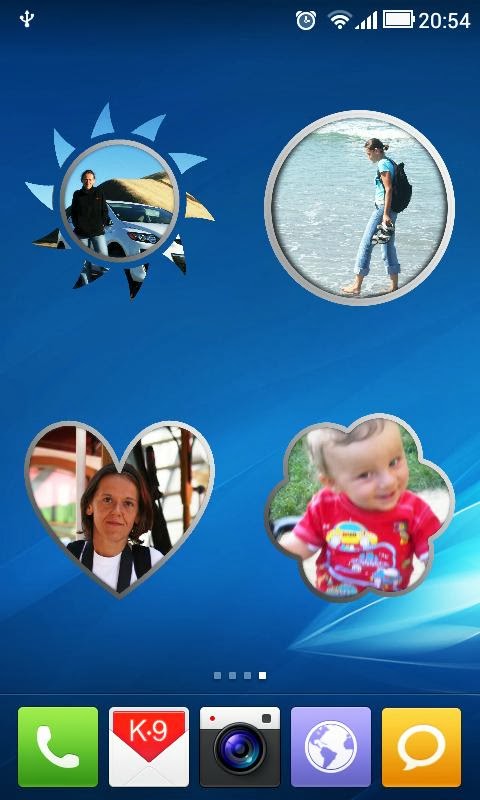
Overview: Decorate Your Phone Desktop More Colorful with Contact Widget Frames.


 Decorate Your Phone Desktop More Colorful with Contact Widget Frames.
Many sizes and shapes, easy to configure.
Editor's Pick from AppEggs.com
Try FREE Version before purchase! :-)
Special notes and drawings options, One-Click option and many more - just check it out!

Avilable contact, picture widgets:
2x2 TRANSPARENT SHAPES! check it out! (NEW)
2x2 Polaroid Picture frame! With rotation settings!
1x4 Multi-choice panel!
1x1-Transparent
1x1-Pure Text
2x1-Dark
2x1-Light
2x2-Picture/Photo - frame
4x4-Picture/Photo - frame(2.3.7+)

Action indicators for one-click widgets (right bottom corner of picture: email, text, call)

With Contact Widget BCW Pro you can:
- put one contact or many contacts on your screen
- select your own image or use default pictures or photos for your contacts
- use Facebook avatar for contact widget picture
- configure actions for contact widgets
- use different contacts widget sizes and shapes
- crop photos to select desired area for widget
- collect notes regarding selected contacts
- organize it the way you want!
- use oneClick or twoClick actions
- decorate your contacts by simply drawing on pictures
- choose skins for buttons in main menu

You can use it also as Photo Widget, Photo Frame or just to place picture using different widget size.

What's New:
v 3.5
- available for Android 4.2

Note: All Premium Features available. no key file needed.

More Info: Google Play

http://adf.ly/2567234/www42.zippyshare.com/v/14412207/file.html