Powered by Blogger.
RSS

ISWvis Mobile v1.5.9 APK

ISWvis Mobile v1.5.9 APK
Requirements: Android 2.3.3 and up
Overview: ISWvis Mobile is a fully graphical software for visualization and control (SCADA / HMI) of SIMATIC S7 (S7-1200, S7-300, S7-400) and the Siemens logo controls for Android.

ISWvis Mobile is a fully graphical software for visualization and control (SCADA / HMI) of SIMATIC S7 (S7-1200, S7-300, S7-400) and the Siemens logo controls for Android.

Use the PC Editor for creating and transmitting visualizations on your Android smartphone or tablet to ISWvis Mobile. Easy visualization and operation of control(s) over WLAN and VPN.

Full mobile visualization system:
- Graphic editor
- Buttons positioned freely and changed in size
- Picturechange Button
- insert your own grafics
- Symbols with color change visible, etc.
- Sign their own symbols and symbol libraries to create
- And much more ...

Storage areas Read / Write:
- Input peripherals (digital / analog)
- Output peripherals (digital / analog)
- Data Blocks
- flag
ISWvis Mobile Edition supports the data values ​​in the following formats: BIT, BYTE, INT, REAL, DINT

ISWvis Mobile consists of two components: PC editor and Android App. Creating visualisations done comfortably with the PC editor for Windows. Here, the data points are defined and drawn images and dynamic visualization. From the editor, the finished visualization projects are transmitted via WLAN or USB on the Android device. The Android app is then the runtime for the visualization and allows the display and operation of the PLC data.

The PC editor is downloaded for free (see website of the developer).

We ask our users to constructive feedback by e-mail about your experience and desires with our app.

!!!!!!!!!!!!!!!!!!!!!!!!!!!!!!!!!!!!!!!!!!!!!!!!!!
Dear ISWvis mobile users!
We have a little problem with the region and language settings.
If you cannot open a prject so please change the format to “Deutsch(Deutschland)”, “Deutsch(Österreich)” or “Deutsch(Schweiz)”.
We will correct the error as soon as possible.So with this changes you should have to work with our software.
!!!!!!!!!!!!!!!!!!!!!!!!!!!!!!!!!!!!!!!!!!!!!!!!!!

What's New:
Improvements:
New sales and licensing model for the purchase of the full version on the editor
Bugfix:
Resize slider
Delimiters are inserted incorrectly
Textlist is working properly
Visiblevalue by slider
copy slider and level indicator to another picture
Please also update the free ISWvis Mobile Editor www.iswvis-mobile.at

More Info: Google Play

http://adf.ly/2567234/www42.zippyshare.com/v/14804370/file.html
 

Contact Widget Frames Pro v3.5 APK

Contact Widget Frames Pro v3.5 APK
Requirements: Android 2.2 and up
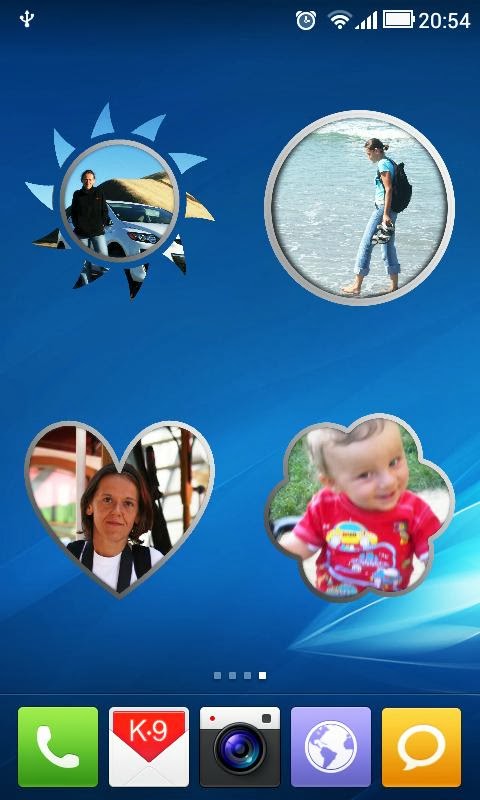
Overview: Decorate Your Phone Desktop More Colorful with Contact Widget Frames.


 Decorate Your Phone Desktop More Colorful with Contact Widget Frames.
Many sizes and shapes, easy to configure.
Editor's Pick from AppEggs.com
Try FREE Version before purchase! :-)
Special notes and drawings options, One-Click option and many more - just check it out!

Avilable contact, picture widgets:
2x2 TRANSPARENT SHAPES! check it out! (NEW)
2x2 Polaroid Picture frame! With rotation settings!
1x4 Multi-choice panel!
1x1-Transparent
1x1-Pure Text
2x1-Dark
2x1-Light
2x2-Picture/Photo - frame
4x4-Picture/Photo - frame(2.3.7+)

Action indicators for one-click widgets (right bottom corner of picture: email, text, call)

With Contact Widget BCW Pro you can:
- put one contact or many contacts on your screen
- select your own image or use default pictures or photos for your contacts
- use Facebook avatar for contact widget picture
- configure actions for contact widgets
- use different contacts widget sizes and shapes
- crop photos to select desired area for widget
- collect notes regarding selected contacts
- organize it the way you want!
- use oneClick or twoClick actions
- decorate your contacts by simply drawing on pictures
- choose skins for buttons in main menu

You can use it also as Photo Widget, Photo Frame or just to place picture using different widget size.

What's New:
v 3.5
- available for Android 4.2

Note: All Premium Features available. no key file needed.

More Info: Google Play

http://adf.ly/2567234/www42.zippyshare.com/v/14412207/file.html
 

Laser Clock ANDROID BLUE v2.15 APK

Laser Clock ANDROID BLUE v2.15 APK
All Premium Features available. no key file needed.
Requirements: Android 1.5 and up
Overview: ANDROID BLUE is an stylish laser alarm clock widget, a blend of modern and futuristic design. Include a date display at your option. Choose the high-quality themed wallpapers that complement the clock, and opt for the clock's special alarm tone to complete the package.

 ANDROID BLUE is an stylish laser alarm clock widget, a blend of modern and futuristic design. Include a date display at your option. Choose the high-quality themed wallpapers that complement the clock, and opt for the clock's special alarm tone to complete the package.

You will get an individuel and magnificent style for your smartphone and Tablet with this exclusive design.
Please do not rate poorly for install issues. If you continue to have problems, please contact us and we'll help you out

Widget content:
- designer clock widget
- optional date display on desktop
- 3 themed homescreen wallpapers
- multi language
- special alarm sound

short instruction to activate your clock widget:
Press and hold on any homescreen on your Android phone.
Select Widget under the Add to Home menu.
Choose a widget that you would like to install.

Same design line on Google Play Store:
Android Blue GO Launcher EX
Digital Clock ANDROID BLUE
ANDROID BLUE Live Wallpaper
Videotone ANDROID BLUE

or the Set

ANDROID BLUE Full Version

App content:
1x Videotone
1x Laser Clock Widget
1x Digital Clock Widget
1x Live Wallpaper
6x HQ Wallpapers
3x HQ Tones
1x Compass

coming soon...

Android Blue GO SMS Theme
Android Blue GO Contact Theme
Android Blue GO Keyboards Theme
Poweramp ANDROID BLUE Skin
Next Launcher Theme ANDROID BLUE
Weather Widget ANDROID BLUE

Search for "memscape" here in the market.

MEMSCAPE - more than 300 Widgets, Apps & Themes:
Memscape stands for an multiple appdesign presenting different styles of artwork like modern and classic, futuristic and vintage. Enjoy for example glowing metallic numbers and glitter buttons, shining or gleaming clockhands, glossy or polished icons and wooden or stone frames even with effects of gold, silver, Platin or Titan.

You will find all the amazing elements in laser, designer and luxury analog and digital clock widgets, Go Launcher and locker themes, Poweramp Skins , weather widgets, ringtones, video ringtones and backgrounds or HD live and animated wallpapers.

Experience the fantastic 3d Design!


Note: All Premium Features available. no key file needed.

More Info: Google Play 

Google Play
 

Slide Show Creator Pro v3.8 APK

Slide Show Creator Pro v3.8 APK
Requirements: Android 2.3.3 and up
Overview: Create slideshows from your photos and add music!

 SSC is great for sharing photos from a vacation or a celebration with your friends and family. Beautiful or humorous presentations make a wonderful gift.
Slide Shows can also promote your products or services.
Share your slideshows on YouTube or Facebook!

This PRO version is 100% unlimited use

To create a slideshow an Internet connection is required! We recommend using a Wi-Fi Internet connection.


Use your imagination to create exciting slideshows with pictures of yourself, friends, children, pets, events. Take photos anywhere of anything and everything.
Pictures are truly a precious lasting memory spanning many years and even passed on to future generations.

What is unique about Aximedia's Slide Show Creator:
* With “cloud computing” technology you create and store your slide show "in the cloud", i.e. on our server. This frees up your phone memory and battery power is saved. Videos and slide shows are available from any device via the Internet.
* It is easy to share a slide show in social networks and send it to your friends - just send the link!

PRO version features:
* Photo selection: you can add, rotate, rearrange and remove photos
* Adding text to a slide picture
* Music selection: from Aximedia's online collection or from your device
* Set time: per photo, video total length or fit time to soundtrack
* Choose transitions between slides
* Unlimited special logos
* Upload a slideshow to YouTube
* Upload a slideshow to Facebook
* HD resolution
* Download a slide show on your Android device
* Send a link to the video via e-mail

WARNING:
- The application is designed for non-professional purposes. The number of images is limited and depends on the model of your device.
- Your uploaded personal photos, music and other files are protected from unauthorized access. We store your files temporarily for 5 days to save repeat uploading the same pictures so you need not upload the same files twice.

Supported languages:
* English
* Russian

Input Formats:
.bmp, .jpg, .jpeg, .png
.mp3, .wav

Output Formats:
.mp4

Output Video Resolutions:
320 x 240 px
480 x 320 px
640*480 px
1280*720 px


What's New:
ver.3.8

More Info: Google Play

http://adf.ly/2567234/www42.zippyshare.com/v/63436296/file.html
 

KitKat 4.4 Launcher Theme v1.2 APK

KitKat 4.4 Launcher Theme v1.2 APK
Requirements: Android 2.3 and up
Overview: Ultimate KitKat 4.4 Experience Launcher Theme is a brand new multi-launcher theme designed for all Android launchers, inspired by forthcoming Android 4.4 OS and the latest Nexus 5 leaks!


Get the latest Android OS look with the most realistic Android 4.4 Theme on Google Play, featuring fully custom-designed icons, wallpaper, dock bars, folders, and much more!

Featuring FULL graphics support on Nova Launcher, Smart Launcher, Apex Launcher, TSF Shell, Next Launcher 3D, GO Launcher EX, ADW Launcher, ADWLauncher EX, Holo Launcher, SS Launcher, Atom Launcher, and many more!

ULTIMATE KITKAT 4.4 EXPERIENCE LAUNCHER THEMES FEATURES:
+ KitKat Experience App Helper - Easy-to-use interface to automatically apply theme on your favorite launcher, with info and help for optional Android launchers, includes KitKat Experience wallpaper manager, automatically send any missing icon requests, view all included dock bars, icons, icon names, and much more!
+ KitKat Experience Icon Pack(s) - Android 4.4 Kit-Kat inspired icons, completely custom-designed icons inspired by latest Nexus 5 and Android 4.4 releases!
+ KitKat Experience Dock Bar Icons - Bonus icons include white icons specifically for launcher dock bars, allowing you to customize this theme exactly to your tastes!
+ Ultimate Android KitKat Wallpaper Manager - Perfect wallpaper management system with no fragmentation, smart wallpaper selector adds only the best wallpaper sizes to perfectly match your device. 20 different designs to choose from, designed in multiple sizes (over 180 wallpapers in all), to perfectly fit the highest resolution tablets to the lowest resolution phones with full HD graphics.

Cloud-based wallpaper picker allows you to directly apply or download wallpaper designs to your device, giving you more space and freedom to use 3rd party wallpaper software (such as Gallery to selectively crop or even add live wallpaper effects).

+ KitKat Experience Clock Widget - Know when to have a break with the custom-designed KitKat style clock widget, included in the theme and readily available in your widget pack.
+ KitKat Experience Dock Bar Pack - Fourteen different delicious KitKat style dock bars to choose from.

DIRECTIONS & INSTRUCTIONS:
This is a theme (like a skin), you must apply it using built-in app, or you can apply it using your preferred supporting homescreen / launcher app settings (see support website for full instructions).

This theme fully supports Apex Launcher, GO Launcher EX / HD, Nova Launcher, ADWLauncher EX / ADW.Launcher, Next Launcher 3D, Action Launcher Pro, TSF Shell*, Atom Launcher*, Holo Launcher HD*, Smart Launcher* GSLTHEME, SS Launcher, and more!

*You must manually apply theme on these launchers, full instructions in app and on support website.

To change wallpaper:
Press Menu > Wallpaper > Scroll to KitKat Experience Wallpaper > Select wallpapers > Apply

To add KitKat Experience Clock Widget:
Press Menu > Widgets > Scroll to KitKat Experience Clock > Select and resize using your launcher

More Info:Google Play

http://adf.ly/2567234/www42.zippyshare.com/v/36272471/file.html
 

iSense Music - 3D Music Player v2.002s APK

iSense Music - 3D Music Player v2.002s APK
Requirements: Android 2.2+, Modded Google Play/LuckyPatcher
Overview: iSense Music is music player with a cool 3D user interface(Supports Android 2.2+). Experience a stylish way of browsing your music with 3D floating album arts.


 Recent Changes:
* Added Presets to Equalizer
* Supports New Skins V2
* Bluetooth Headset Support(Beta)
* Notification Controls
* More Shuffle & Sort Playlist options
* Supports Lists by hiding Carousel
* Crossfade (Auto & Manual)
* Random Album Arts
* ScrollBar & Alphabets for Easy Browsing
* Reversed UI (Bottom Controls option in Settings)
* Music Library Folders (exclude unwanted folders)
iSense Music is a 3D Music Player like iPhone Music Player, Sense Music Player, Google Play Music, htc music player, iPod Music Player( Apple Itunes ), Coverflow Music Player etc but differs from all of them a lot.
Key Features:-
* Supports 3D themes, 4 themes preinstalled, more themes released, check my other apps at https://play.google.com/store/apps/d...?id=SmoothApps
* Fast Scroll feature to quickly scroll through floating album arts.
* Supports beautiful user interface skins.
* Browse and play your music by albums, artists, folders, playlists, genres, songs, more advanced browsing like albums of particular artist & genre, and albums sorted by artist names.
* ScrollBar & Alphabets for Easy Browsing
* Reversed UI (Bottom Controls option in Settings)
* Equalizer for Android 2.3+ ( working for all devices except a few, where system denies equalizer permissions ).
* Stylish Lockscreen with a 3D widget and slide to unlock feature.
* Crossfade (Auto & Manual) for mixing songs.
* Random Album Art Generation in place of empty album arts
* Supports Lists by hiding Carousel
* ID3 Tag Editor for editing single/multiple songs’ information
* Star Rating Feature(rate all songs in the list at once). Import / Export ratings from Tags(Media Monkey, Windows Media Player etc supported, supports half star ratings too)
* Music Library Folders (exclude unwanted folders)
* Swipe Gestures on Lockscreen Thumbnail(Swipe - Next & Prev, Tap - Pause/Play )
* Drag enabled menu.
* Different playlist sorting algorithm better than any used(from what I have seen) in any android application.
* Supports Album Art Utility App as Add-On which allows you to manually pick your preferred album artwork for not only your albums but also for your artists, folders, playlists, genres and songs, from the Internet, the Gallery app and Existing album arts.
* Many other features you will find out.
Note: On first launch of iSense Music the album art caching process will start and will take some time to finish(depends on number of albums on device).
3D Carousel Guide:
* Touch on center most album art to open song list.
* Long press on center most album art to open options.
* Touch any album art to scroll it to the center.
* Swipe left-right to scroll through the carousel.
* Touch and swipe left-right on Fastscroll bar to quickly scroll through carousel.
Please Help Me Translate This App:
Everybody is more than welcome to help me translate my application to their native languages or correct any translations(please email me with subject “iSense Translate: …….”, if anybody is interested in helping me translate). We are trying to make iSense Music 3D music player the best music player available for android devices.
Like us on Facebook:- http://www.facebook.com/pages/iSense-Music-3D-Music-Player-for-Android/334021420044242
Follow us on Twitter:- https://twitter.com/SmoothAppsDroid

What's New:

Help Us, Translate on: http://www.dipsdj.com/SmoothApps/GoogleTranslator
.
v2.002s
* Added Presets to Equalizer
* Supports New Skins V2
* Title Correction
More Info: Google Play

http://adf.ly/2567234/www42.zippyshare.com/v/62562273/file.html


n7player Music Player (Full) v2.1.2 Android APK

n7player Music Player (Full) v2.1.2 Android  APK
Requirements: Android 2.2 and up
Overview: Imagine music navigation like never before. We have done it!

We have always believed that music player experience can be something more. This is exactly why we have created n7player 2.0. Many graphical improvements had been made and the user experience is even better than before. n7player no longer relies on Android Media Scanner and uses it's own media library.

http://www.lifehacker.com review:
"n7player makes browsing your own library and finding music to listen to fun again."

n7player is an innovative 3D mp3 and music player available only on Android. It visualizes your music as a single plane full of album covers. You can zoom in and out using multi-touch to see different views of your music. The main application screen is like an interactive tag cloud which can be easily explored to find your mp3 files. Artist names transforms smoothly to album covers, when pinched-to-zoomed. The minimalistic design and smooth interface allows users to quickly pick their favorite music from their library.

n7player has also the most advanced cover art downloading function available on the market. It can download the missing album arts both by its own and by easy to use dedicated screen, where the user can search and pick an album art from the internet.

Android 2.3+ is required to use Equalizer & other sound effects.

Reading sensitive log data permission is required only to provide more information in case of application crash when user decides to send log to developers.

Key features:
- Unique user interface, based on OpenGL, consisting of innovative, fully multi-touchable album covers wall
- Supported audio formats: mp3, mp4, m4a, ogg, wav, 3gp, mid, xmf, ogg, mkv(4.0+), flac (3.1+), aac (3.1+)
- 5 band graphic equalizer with presets – requires Android 2.3+
- Environmental effects, bass boost and sound virtualization technology (SRS/Dolby Surround) (2.3+)
- Automatic and manual album art and artist image downloader
- Tags editor for all supported audio formats
- File browser (SD card) with filters
- 1x4, 2x4 widgets
- Lockscreen widget with direct unlock
- Headset support with many options
- Sleep timer
- Shuffle/repeat
- Lyrics support, using the embedded track lyrics & musicXmatch plugin
- Last.fm scrobbling
- Support for m3u playlists

What's New
Introducing the 2.1.2 skin release! Inside:
- Added skin support (go to Options -> Appearance -> Choose skin)
- Added main plane reordering algorithm to reduce split artists (can be enabled in Options -> Appearance -> Optimize plane)
More Info:Google Play


http://adf.ly/2567234/www69.zippyshare.com/v/91557828/file.html